
What is Google Antigravity: The Future of Agent-Driven Software Development
Introduction
In late 2025, Google introduced Antigravity as a radical new platform for software development. It shifts the paradigm from “AI assisting a human” to “AI agents collaborating as developers.” In this article we’ll cover:
What Antigravity is and how you use it
Its key features, strengths and weaknesses
How it stacks up against Cursor and n8n
What these differences mean in practice
Where this space might go next
What Is Google Antigravity & How It Works
Overview
Antigravity is an “agent-first” development platform by Google, built on its new model Gemini 3 Pro. blog.google+2Venturebeat+2
Public preview launched November 18, 2025 for Windows, macOS and Linux. Vikipedi+1
Key idea: rather than just offering suggestions, Antigravity gives AI agents direct access to tools — code editor, terminal/shell, browser — so they can plan, execute and report outcomes. Venturebeat+1
How It Works: User Flow
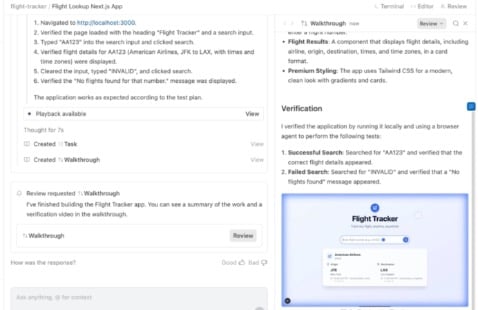
Agent creation: You define a high-level task or goal (for example: “Build a dashboard with live data and tests”).
Agent access: The agent uses the code editor environment, runs commands in the terminal, opens a browser, executes tests.
Artifacts & verification: The agent generates “Artifacts” such as task lists, screenshots, browser recordings, summaries of what it did and plans next. The Verge+1
Two main views:
Key Features at a Glance
Multi-agent orchestration: spawn and monitor multiple agents working concurrently.
Full tool-access: agents aren’t limited to code suggestions—they can execute and deploy.
Artifact-based traceability: what the agent did and plans to do is visible & auditable.
Model flexibility: while Gemini 3 Pro is the core, platform reportedly supports other models too. The Verge
Free preview: currently available at no cost (but with rate-limits) during the preview phase. The Times of India
Strengths of Antigravity
High autonomy: Agents can take on entire development tasks rather than just filling in code lines.
Full integration: Editor + terminal + browser in one platform means fewer tool-switches.
Team & scale oriented: With multi-agent and Manager View, it’s built for more than solo coding.
Transparency built-in: Artifact system provides insight into what agents did, which increases trust.
Backing & ecosystem: Built by Google, leveraging cutting-edge model Gemini 3 Pro.
Weaknesses & Considerations
Early stage / Preview: As a new platform, there may be bugs, missing features, and instability.
Learning curve: Developers must adapt to thinking in “tasks + agents” rather than just “write code”.
Ecosystem lock-in risk: Deep integration with Google stack means migrating away later might be harder.
Overkill for simple tasks: If you just need simple autocomplete or code suggestion, this platform may be heavier than needed.
Security & oversight: Granting agent access to terminal/browser raises new risks (shell commands, browser automation) — oversight is required.
Pricing & Licensing
Currently: Free in public preview with “generous rate limits” on usage. The Verge+1
Full pricing for post-preview or enterprise usage not yet fully published.
Given model usage (Gemini 3 Pro) and deep features, future cost is likely to be significant for large teams.
Comparing Antigravity to Cursor & n8n
Overview of Competitors
Cursor (by Anysphere)
AI-powered code editor (fork of VS Code) focused on developer productivity, deep code-base understanding, and refactoring. DataCamp+1
Features include smart rewrites, indexing entire codebase, prompt-based refactoring. Medium+1
Pricing & mode: Token-based pricing, request-based usage (as of mid-2025). Cursor+1
n8n
Workflow automation platform (node-based visual builder) for integrating apps, automating business processes, dev-ops flows. n8n.io
Plans start at ~€20/month for 2.5k executions in cloud. n8n.io+1
Focus is not “write code editor”, but “connect & automate systems and workflows”.
Feature Comparison Table
| Platform | Primary Focus | Strengths | Limitations |
|---|---|---|---|
| Antigravity | Agent-first development (editor + orchestration) | Multi-agent, full tool access, high automation | New, possibly complex for simple dev tasks |
| Cursor | AI-enhanced code editor for developers | Deep code-base understanding, refactoring support | Limited orchestration, not full agent platform |
| n8n | Workflow & automation across tools/services | Visual automation, many integrations | Not built for code editing or full agent dev workflows |
How They Differ in Practice
Task Scope:
Antigravity: Build entire features via AI agents (code, test, deploy).
Cursor: Enhance your coding workflow (autocomplete, refactor, fix bugs).
n8n: Automate processes (data pipelines, API integrations, business logic).
Workflow Complexity:
Antigravity: High — multi-agent, full dev stack.
Cursor: Medium — daily coding tasks, refactoring, productivity.
n8n: Variable — depends on number of integrations and workflows.
Tool Switching:
Antigravity aims to reduce switching (editor + terminal + browser in one).
Cursor still primarily editor-centric, may use other tools for terminal/browser.
n8n focuses on workflows, less on code writing environment.
Team vs Solo Developer Fit:
Antigravity: Best for teams working on large codebases or multiple agents.
Cursor: Very good for individual devs or smaller teams focusing on code.
n8n: Ideal for teams automating integrations, ops, less writing new features.
Use-Case Example
Suppose you need to build a microservice including API, UI, tests, deployment:
Use Antigravity: spawn an agent “Build microservice”, let it scaffold backend, UI, test, deploy, then review.
Use Cursor: You write code; Cursor helps you refactor quickly, understand your codebase, generate tests.
Use n8n: You automate the pipeline: webhook triggers build → test → deploy → notify Slack.
Why This Matters & Future Outlook
Why It Matters
The shift from “AI suggestion” to “AI agent” reflects the next phase of developer tooling. Antigravity is a major step in that direction.
As codebases grow and teams expand, higher-level abstraction becomes more necessary: you want to manage tasks, not type every line.
Having fewer context-switches (editor + terminal + browser) improves efficiency and reduces cognitive load.
Integrations and automation (n8n-style) are becoming part of developer workflows, not just business-ops workflows.
Future Trends & What to Watch
Agent ecosystems: More platforms will provide agent orchestration, specialized agents, plug-and-play agents for dev tasks.
Model improvement: Models like Gemini 3 Pro show that tool-use (terminal/browser) is now viable; this will improve further. blog.google
Security & governance: With agents having elevated access (shell, browser), governance, traceability, artifact logs will become critical.
Hybrid workflows: Platforms may combine elements: editor + automation + orchestration + business workflows.
Accessibility & pricing: As these platforms become mature, pricing, usage-models, and democratization will matter (not just for big companies).
Final Thoughts
Google Antigravity is a bold vision of what developer tools could become: where you delegate entire tasks to AI, monitor them, and focus on high-level design. It’s powerful, built on top of Gemini 3 Pro, and supports a future where agents do more of the heavy lifting.
That said, if you’re an individual developer today working on code, you may still prefer a tool like Cursor for daily workflow enhancements. If you’re more about automating workflows and systems rather than writing fresh code, then n8n remains a strong choice.
In short:
For full agent-driven development → Antigravity
For refined code editing + AI assistance → Cursor
For workflow automation and integrations → n8n
If you like, I can draft a downloadable PDF of this article (formatted for blog posting) or prepare screenshots & demo workflows showing Antigravity vs Cursor vs n8n side-by-side.